Mini Review: Volt Vs Focus EV

At a supplier demo event recently, I was given the chance to test drive, back to back, a Chevrolet Volt and a Ford Focus EV.

Image courtesy of Edmunds.com

I was amazed at how obviously different the two vehicles were in driving character, and  particularly, in their sounds.

The Volt, from the driver's seat, was a little cramped, I found my head a bit close to the headliner at the sides, and had to lower my seat a bit more than I would like.  The center stack was a mess of graphical buttons, which were not fast to learn, though I am sure with time you would get used to it.  The interior finish was a mix of shiny hard plastic and crinkly hard plastic, for the most part.  I wasn't really a fan of the high-gloss finish on much of the plastic.
  
The driving experience of the Volt was pleasant, with lots of torque from standstill and good acceleration through about 50mph, which was as fast as I had a chance to take it.  The car felt fairly heavy, but body movement was smooth and controlled. 

The regenerative brakes didn't fell bad, they had a bit of a grabby feel until you got used to them.

The rear passenger space on the Volt isn't good for adults.  I was banging my head on the headliner near the windscreen, and the seating position was not pleasant.  I would not want to be a rear passenger for more than a short trip in the Volt.

I thought the IP graphics were nice, but I was annoyed at the animated green ball that GM is using to indicate regen.   It is constantly animated, rotating in place or shrinking/growing, and I found it distracting. 

Next I had a chance to sample the Focus EV.

The Focus EV had a much sportier character, handling wise, than the Volt.  It also had a much more conventional interior, basically the same as the gasoline Focus in high-end trim.  The switchgear was normal and easy to use, and the LCD IP had more traditional style bar graph/pie chart type graphics. 

The Focus also had lots of lower speed torque, and accelerated easily to 50mph without trouble.  The regen braking was smooth and wasn't obtrusive, to me.  I thought the pedal feel was more linear than the Volt.

I didn't have a chance to ride in the rear seat of the Focus, but I heard that the battery package does compromise the leg room and cargo floor.

The big difference between the two vehicles, other than the interior, was the overall sound in the cabin.  The Volt was much boomier than the Focus, letting in more low to mid frequency road noise, combined with noticeable whine during regen braking.  There was also a quiet, high frequency sound when accelerating, almost a whistle.  The Focus also had some electric whine during acceleration and braking, but it was noticeably quieter than the Volt.  Comparing either vehicle to a gasoline car of the same class is eye opening--these vehicles are shockingly quiet in electric propulsion mode.  I would even say the quietness is a major reason to buy an electric vehicle.

Neither vehicle would really work for me as they stand.  For about the same price, I would like a Focus EV with a gasoline range extender, though this beast would not have room for the extra equipment.   The Volt is a great car, if you are willing to overlook seating utility and funky controls in exchange for a range extending gasoline engine.  The Focus EV is a fantastic car, if you can live with the restrictions on range (76mi EPA estimate). 

If I had to pick one for my $40,000 before credits, I would take the Focus EV as a better place to sit as driver.  It is really neat to drive, as long as your range holds out.

Volt Pluses:

  • Unobtrusive gasoline range extender
  • Decent handling
  • Good acceleration
  • Snazzy graphics on IP

Volt Minuses:

  • Glossy or crinkly hard plastic interior
  • Animated graphics annoying
  • Road noise and braking whine
  • Cramped rear seats
  • MSRP

Focus EV Pluses:

  • Gasoline Focus interior
  • Gasoline Focus chassis
  • Very quiet

Focus EV Minuses:

  • 76mile range
  • Rear seat leg room
  • Compromised cargo space
  • MSRP


WIRED Autopia slips into driver's seat of QNX reference vehicle

Chances are, you've seen pictures of the new QNX reference vehicle. You may have even seen the "making of" video that QNX released a few days ago. But have you seen any video of the vehicle in action?

If not, check out this vid by Doug Newcomb of WIRED Autopia. Last week, at Telematics Detroit, Doug met up with Andrew Poliak of QNX for a tour of the vehicle and its various features, including a re-skinnable UI and voice-controlled Facebook integration. The camera was rolling, and here's what it caught:


HTML5 brings new buzz to infotainment system development

QNX to unveil QNX CAR 2 platform on Freescale i.MX 6 at FTF Americas — a guest post from Paul Sykes of Freescale

If you’ve visited the QNX website recently or attended the Telematics Detroit conference last week, then you’ve surely noticed that HTML5 is getting a lot of attention in automotive these days. The buzz around HTML5 focuses on two areas: as an application development and delivery framework, and as an HMI framework. In discussions with many industry participants, my impression is that the application framework part is generally accepted, while the HMI framework part still isn’t well understood.

I don’t intend to discuss these HTML5 aspects in detail. There are experts within the ecosystem that can do a much better job than me. But I will say that Freescale applications processors will offer the processing and graphics performance to run the desired applications and bring the HMI to life with stunning graphics.

Next week, Freescale will host the annual FTF Americas event in San Antonio, TX. We are very excited about the first public unveiling of the QNX CAR 2 application platform on i.MX 6. Since QNX CAR 2 is based on HTML5, it is particularly fitting to mention in this blog. For those with an interest in understanding more about HTML5 for infotainment systems, QNX and many other ecosystem partners will be on hand at FTF to discuss their thoughts and plans.

Paul Sykes is a member of Freescale’s driver information systems team.


The making of the QNX reference vehicle: Jeep Wrangler

Guest post from Nicole Forget of QNX Software Systems
Nicole Forget


Just one week ago, our new reference vehicle was revealed at Telematics Detroit 2012. The Jeep Wrangler features QNX’s digital instrument cluster, which is totally re-skinnable. In fact, the entire user interface of the head unit, which was created using HTML5, can also be re-skinned. The head unit supports loads of functions, too, including the virtual mechanic, which are outlined in an earlier post.

The following video gives you some insight into the hard work that was put into the making of the reference vehicle. Check it out!


SOLD - JZX 100 Chaser - Half Cut

SOLD To Local Customer
This Half Cut Model JZX 100 - Chaser - Engine 1JZ-GTE - VVTI - Auto, Selling Together With All The Parts Shown In The Photos

Selling As Is Where Is Basis

To View Engine Revving, Click Video Below :-


General View Of The Half Cut

General View Of The Odometer

Mileage Reading :- 149761 Kilometers Or 93,057 Miles

Engine Tag Information

Chassis Number

Front View Of The Engine Bay

Side View Of The Engine Bay

Side View Of The Engine Bay

Turbo

Front View Of The Auto Gear Box

Side View Of The Auto Gear Box

Side View Of The Auto Gear Box

Rear View Of The Auto Gear Box

Bonnet - Dented / Bumper - Good Condition

Driver Side

Driver Side - Head Lamp With Signal Lamp - Good Condition

Driver Side - Aftermarket Absorber With Brake Caliper And Rotor

Driver Side - Aftermarket Absorber - Brand :- Tein - High/Low/Soft/Hard - Good Condition

Driver Side - Fender - Close View Of The Dented Area

Passenger Side

Passenger Side - Head Lamp With Signal Lamp - Good Condition

Passenger Side - Fender - Dented

Passenger Side - Aftermarket Absorber With Brake Caliper And Rotor

Passenger Side - Aftermarket Absorber - Brand:- Tein - High/Low/Soft/Hard - Good Condition

Passenger Side - Fender - Dented

Aftermarket Rear Absorbers - Brand :- Tein - High/Low/Soft/Hard - Good Condition


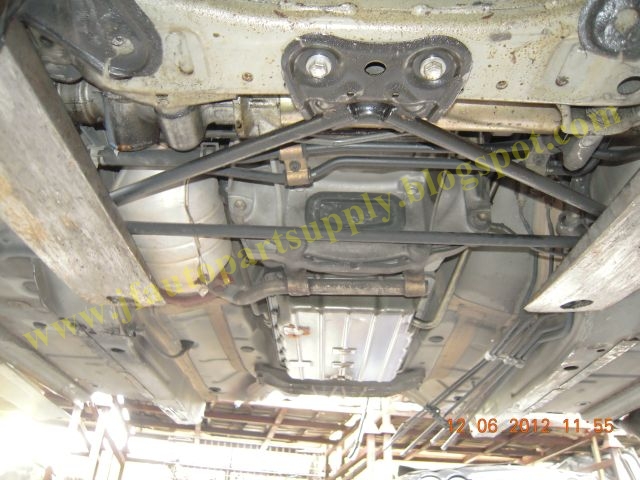
Long Shaft

Rear Axle With Complete Frame

General View Of The Half Cut

Moving beyond the browser: HTML5 as an automotive app environment

If you’ve already visited this blog, you’ll know that we are bullish on HTML5 as a way to implement infotainment system HMIs. Not surprisingly, I’ve spent a fair amount of time searching the Web for facts and opinions on using HTML5 in the car, to see how this idea is catching on.

Overall, people see numerous benefits, such as the ability to leverage mobile app development to keep pace with the consumer demands, the availability of a large pool of knowledgeable developers, and the attractiveness of a truly open specification supported by many possible vendors.

But when it comes to the challenges of making HTML5 a reality in the car, I found a common thread of questions, mostly rooted in the erroneous belief that an HTML5 application environment is “just a browser.” Everyone is familiar with the concept of a browser, so it’s easy to see why people take this point of view.

So what are the key differences between a browser and an HTML5 application environment? Here’s my quick view.

The experience
Everyone is familiar with the browser experience. You navigate to a web site through bookmarks, a search engine, or direct entry of a URL. The browser implements a user interface (aka the chrome) around a rendering engine and provides bookmarks, URL entry, back and forward, scrolling and panning, and other familiar features.

An automotive HMI based on HTML5 provides a different experience — just look at the accompanying screen shots and decide for yourself if they look like a browser. In fact, the user experience of an HTML5-based HMI is similar to that of any other purpose-built HMI. It can consist of a main screen, window management, navigation controls, and other typical user interface widgets.


A radio tuner and a media player from the QNX CAR 2 application platform. Both apps are based on HTML5, but beyond that, they neither act nor look like a web browser.

A system that uses an HTML5-based HMI can include:

  • core applications that look and act like native applications
     
  • add-on (downloaded and installed) applications that have controlled interfaces to the underlying hardware
     
  • “web link” applications that simply link to a cloud-hosted application that can be downloaded on demand and cached

The web link approach makes it easy to update applications: just update the server and the remote client systems will automatically pull the application when needed.

Local resources
Web browsers pull text, images, and other content from the web and render it on the user’s machine. The process of loading this remote content accounts for much of the user’s wait time. This paradigm changes with a local HTML5 application environment — because resources can exist locally, images and other components can load much more quickly.

What’s more, screens and user interfaces can be designed to fit the platform’s display characteristics. There is no need for panning and scrolling, and only limited need for zooming. Resources such as RAM can be optimized for this experience.

Security and sandboxing
Browsers load content and executable JavaScript code dynamically. This really is the power of the web technologies. The problem is, dynamically loaded code represents a threat to an embedded platform.

Browsers are designed to be sandboxed. By default, JavaScript code can execute only in the context of a browser engine, and cannot access the underlying operating system primitives and hardware. This approach changes in an HTML5 application environment. To give JavaScript code the ability to behave like a native application, the environment needs interfaces to the underlying OS through to the hardware. Plugins are used to implement these HTML5-to-OS interfaces.

Nonetheless, access to the underlying platform must be carefully controlled. Hence, a security scheme forms a critical component of the HTML5 application environment.

Application packaging
The app experience has become familiar to anyone who owns a smartphone or tablet. An HTML5 application environment in the car can also support this kind of experience: developers create and sign application packages, and users can download those packages from an application store. In an automotive context, authenticity of the applications and control over what they can or cannot do is critical. Again, a security model that enforces this forms a key part of the HTML5 application environment.

So, how should you think of an HTML5 application environment?
From my perspective, an HTML5 environment is like any other traditional HMI toolkit, but with much more flexibility and with inherent support for connected applications. In an HTML5 application environment, you can find technologies similar to those of any proprietary toolkit, including:

  • a rendering engine (HTML5 rendering engine)
  • a set of content authoring and packaging tools
  • layout specifications (HTML5 and CSS3)
  • a programming language (JavaScript)
  • an underlying data model (DOM)

The difference is, these components are developed with a web experience in mind. This, to me, is the most significant benefit: the web platform is open, scalable, and well understood by countless developers.

Noooooooooooooooooooo!

Sad news.  Tom and Ray Magliozzi (aka Click and Clack, the Tappet Bros) are hanging it up after 25 years on the radio.

At least there are many years worth of back shows to listen to via streaming.